






How to Add Real-Time Features to Your AI-Built App
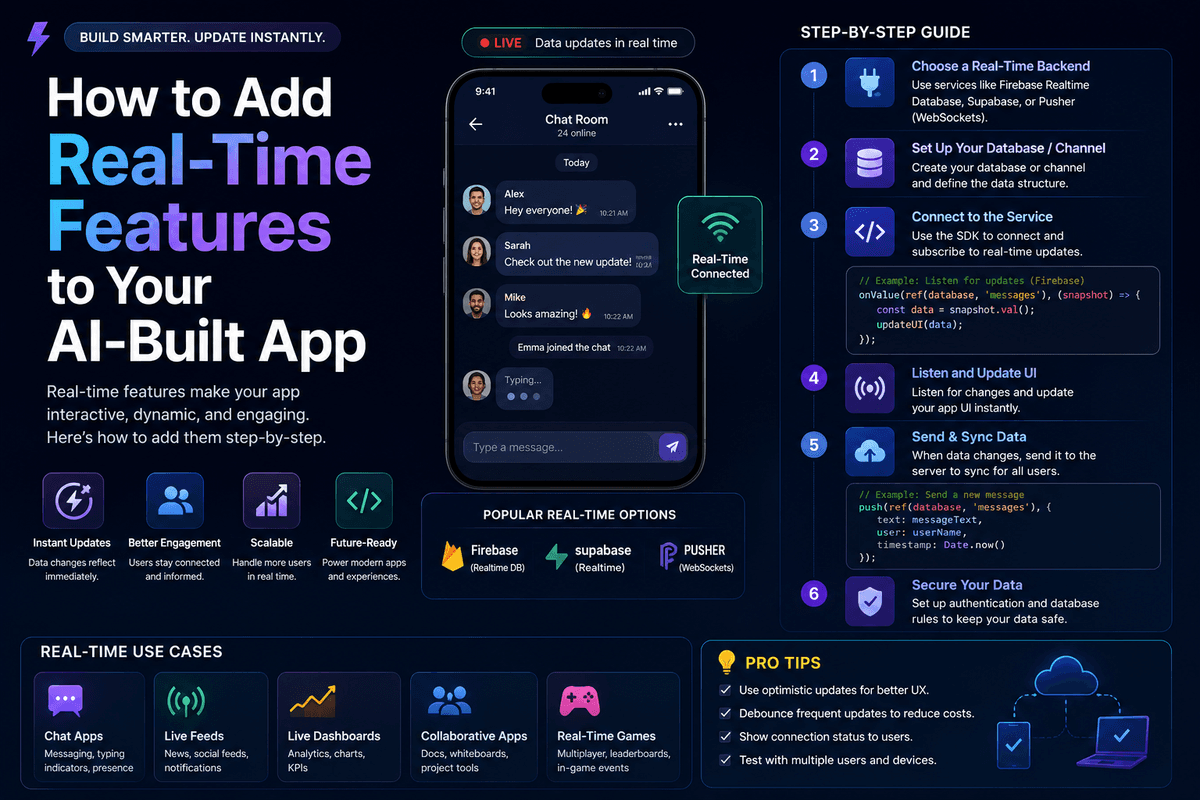
TL;DR
You can add real-time features to your AI-built app — live chat, presence indicators, live data updates, notifications, and collaborative editing — using Supabase Realtime, Pusher, Ably, or built-in WebSocket support on modern vibe coding platforms. The trick is to prompt for one real-time feature at a time, in dependency order, and to test for race conditions on day one. Done right, you can add a working real-time layer in 2–4 hours.
Introduction
Real-time features used to be the domain of senior engineers. WebSocket connection management, presence tracking, race conditions, scaling concerns — none of it was approachable for a non-developer. That barrier has dropped dramatically in 2026. Modern AI app builders can wire up real-time chat, live dashboards, and collaborative editing from a few well-structured prompts, with Supabase, Pusher, or Ably handling the infrastructure underneath.
This guide walks through exactly how to add real-time features to your AI-built app. You'll get the prompt patterns, the architecture decisions, and the common traps to avoid. By the end, you'll know what to add, in what order, and how to ship it without breaking your existing app.
What counts as a real-time feature and which ones matter most?
A real-time feature is anything where the UI updates without a manual refresh — chat messages appearing instantly, presence dots showing who's online, dashboards updating as new data arrives, notifications pinging in-app. The unifying technical trait is a persistent connection (usually a WebSocket) that pushes updates from server to client.
Not all real-time features are equally valuable to add. The ones that consistently lift user engagement and retention are:
- Live chat or comments — Highest emotional impact, drives session length
- Presence indicators — Shows who's online, drives social proof and collaboration
- Live data dashboards — Replaces refresh-button fatigue, common in analytics tools
- In-app notifications — Drives re-engagement and important state changes
- Collaborative editing — Premium feature, justifies higher pricing
- Live cursors — Subtle but high-perceived-value (Figma popularized this)
- Status updates — Order tracking, build progress, AI generation status
For most early-stage AI-built apps, live chat and in-app notifications deliver the biggest perceived value per hour of build time.
What infrastructure powers real-time features?
Real-time features need infrastructure that maintains a persistent connection between the client and server. In 2026, three providers dominate the real-time space for vibe-coded apps, plus a few built-in options on specific platforms.
| Provider | Best For | Pricing Model | Standout Feature |
|---|---|---|---|
| Supabase Realtime | Default choice for Lovable, Bolt, Greta | Free tier + usage-based | Built into the same backend as your database |
| Pusher | Established, reliable, broad integrations | Per-message tier pricing | Mature SDKs, presence channels |
| Ably | Scale-focused, low-latency | Per-message and connection tiers | Strong at scale, lower latency |
| Liveblocks | Collaborative editing specifically | Per-connection pricing | Live cursors, multiplayer text editing |
| Built-in WebSocket | Greta, Emergent, Replit Agent | Bundled with platform | No external account to manage |
For most non-developers, Supabase Realtime is the easiest starting point because it ships built into the database you're already using. The platform uses Supabase as its backend layer, which means real-time comes essentially free if you're already on the platform.
How to add real-time features to your AI-built app — step by step
The realistic timeline for adding a working real-time feature is 2–4 hours. Here's the sequence that consistently works.
- Step 1: Pick exactly one real-time feature — Don't try to add chat, presence, and notifications in one session. Pick the highest-value one for your users and start there.
- Step 2: Confirm your backend supports real-time — If you're on Supabase, enable Realtime in the dashboard. If on Pusher or Ably, create an account and grab API keys.
- Step 3: Prompt the data model first — Define the table or channel that will hold the real-time data (messages, presence, events). Use the structured pattern from our Ultimate Prompt Library for AI App Builders.
- Step 4: Prompt the subscription — Ask the AI to subscribe the relevant component to changes on that table or channel.
- Step 5: Prompt the UI updates — Make sure the UI updates optimistically on the sender's side and reactively on every other client.
- Step 6: Test with two browsers or devices — Open the app in two windows. Send a message in one; confirm it appears in the other in under 1 second.
- Step 7: Handle disconnects gracefully — Prompt explicitly for a graceful offline state and auto-reconnect when the connection drops.
- Step 8: Set up basic rate limiting — Prevent abuse (and runaway API costs) by capping how often a user can trigger real-time events.
Each step maps to one or two focused prompts. Don't combine them — race conditions hide in collapsed prompts.
Build this with a prompt on Greta.sh — describe the app, Greta writes and deploys it.Copy-ready prompts for real-time features
Below are the specific prompts that work consistently across modern vibe coding platforms. Use the placeholders in brackets and swap in your specifics.
Prompts for live chat
| Prompt Type | Template |
|---|---|
| Chat schema | "Create a Messages table with fields: id, user_id, content (text), conversation_id, created_at. Add a foreign key from user_id to users." |
| Chat UI | "Add a chat interface for [page or context]. Show messages in chronological order with user avatar, name, content, and timestamp. Auto-scroll to bottom on new message." |
| Real-time subscription | "Subscribe this chat component to the Messages table using Supabase Realtime. When a new row is inserted matching the current conversation_id, append it to the message list." |
| Optimistic UI | "When the current user sends a message, show it in the UI immediately, then reconcile with the server response. Show a small 'sent' indicator once confirmed." |
Prompts for presence
| Prompt Type | Template |
|---|---|
| Presence tracking | "Track which users are currently online using Supabase Realtime presence. Update a small dot next to each user's avatar — green for online, gray for offline." |
| Active on page | "Show which users are currently viewing this specific [page or document]. Display avatars in a row at the top of the page." |
| Last seen | "If a user is offline, show 'last seen' relative time (e.g., '2 hours ago') next to their avatar." |
Prompts for live data updates
| Prompt Type | Template |
|---|---|
| Live counter | "Add a live counter on the dashboard showing total [entity] count. Update in real time whenever a new [entity] is created or deleted." |
| Live list | "Make the [entity] list update in real time. When a new [entity] is added by any user, prepend it to the visible list without a page refresh." |
| Live chart | "Update the dashboard chart in real time as new data arrives. Animate the new data point smoothly into the chart rather than redrawing the entire chart." |
Prompts for notifications
| Prompt Type | Template |
|---|---|
| In-app toast | "Add a toast notification that appears for 4 seconds in the bottom-right when a new event affects the current user. Stack multiple toasts vertically." |
| Notification bell | "Add a notification bell in the header showing unread count. Click opens a dropdown listing recent notifications, with mark-as-read on click." |
| Browser notifications | "Add browser notifications (with permission prompt on first use) for high-priority events. Fall back to in-app toasts if browser notifications are denied." |
Which AI app builders handle real-time features best?
Not every vibe coding platform handles real-time equally well. Some have native integrations; others require manual API setup.
- Greta — Built-in real-time support with multiple backend options (Supabase, MongoDB), bundled growth and analytics tooling makes it easy to track real-time engagement.
- Lovable — Strong real-time via its native Supabase integration. Creates complete applications including frontend, backend, database, authentication, and deployment, with Supabase Realtime accessible via prompts.
- Bolt — Works well with Supabase Realtime; manual prompting for subscriptions required.
- Emergent — Strong for complex real-time apps because its multi-agent architecture handles the backend wiring well. We cover its multi-agent approach in Greta vs Emergent.
- Cursor / Replit Agent — Most flexible but requires more technical comfort. Good for hybrid teams blending vibe coding and traditional engineering.
For most non-developers adding real-time to a v1 app, Greta and Lovable are the fastest paths because real-time infrastructure is one prompt away.
How to think about scale and cost
Real-time features are deceptively easy to enable and surprisingly easy to make expensive. The cost model is different from regular API requests — you pay per connection, per message, or per concurrent user, depending on the provider.
- Supabase Realtime — Free tier covers a small app comfortably. Paid tier scales with concurrent connections and message volume.
- Pusher — Per-connection and per-message pricing. Predictable, but can spike with active users.
- Ably — Per-message pricing, optimized for high-volume real-time apps. Cheaper at scale than Pusher.
- Liveblocks — Per-concurrent-connection pricing. Designed for collaborative apps where 5–50 users are active simultaneously.
- Built-in platform real-time — Bundled with platform subscription; usually fine until you hit thousands of concurrent users.
For most apps below 1,000 daily active users, real-time costs stay under $50/month. Apps with active social or collaboration features (think live chat in a community app) can hit $500+/month at moderate scale. Budget for this before launching a real-time feature, especially if your app is freemium.
Where real-time features add the most product value
Some app categories are transformed by real-time features. Others gain almost nothing. Match deliberately.
- Community and chat apps — Real-time is the entire product. Non-negotiable.
- Collaboration tools — Live cursors and presence are the difference between an MVP and a "real" product.
- Analytics dashboards — Live data feels premium and reduces refresh fatigue. High ROI.
- AI generation apps — Streaming status ("generating…" → "almost done…" → result) reduces perceived wait time dramatically.
- Marketplaces and bookings — Live inventory updates ("only 2 left") drive urgency and conversion.
- Order tracking — Real-time delivery and status updates are now a baseline expectation.
If you're building one of these app types, real-time isn't optional — it's table stakes. For other categories (CRMs, simple AI tools, content generators), real-time is a nice-to-have but not a v1 requirement. If you're picking an app idea, our list of profitable AI app ideas flags which categories benefit most from real-time.
Want to try one of these? Start on Greta.sh — no setup, no boilerplate — just a prompt.Common Mistakes to Avoid
- Adding multiple real-time features in one prompt — Race conditions hide in collapsed prompts. Add chat first, ship it, then add presence. One feature per prompt.
- Forgetting authentication context in real-time subscriptions — A common bug: users see other users' private messages because the subscription wasn't scoped to the current user. Always prompt for row-level security explicitly.
- Skipping the multi-device test — Browser emulators lie. Always test real-time features with two real browsers or devices to confirm updates propagate.
- Ignoring disconnect handling — Real-time connections drop. Prompt explicitly for graceful disconnect handling and auto-reconnect, or your app will silently break on flaky Wi-Fi.
- No rate limiting — Without rate limits, a malicious user (or a bug) can flood your real-time channel and spike your costs. Set a sensible per-user cap from day one.
- Optimistic UI without reconciliation — Showing a message immediately on send is great UX, but you must reconcile with the server response. Otherwise failed sends look successful.
- Real-time everywhere — Not every list needs to be real-time. Pick the 2–3 places where real-time adds genuine product value and leave the rest as standard fetches.
Frequently Asked Questions
1. Can a non-developer really add real-time features to an AI-built app?
Yes — modern vibe coding platforms like Greta, Lovable, Bolt, and Emergent handle real-time wiring through structured prompts. The hardest part isn't the AI; it's understanding the architecture choices (which channel to subscribe to, how to scope to the current user) well enough to prompt for them clearly.
2. Which real-time provider should I use for my AI-built app?
For most apps, Supabase Realtime is the default starting point because it ships with the database you're likely already using. Pusher and Ably are better for higher-volume apps that need more configurability. Liveblocks is best if your core feature is collaborative editing.
3. How long does it take to add a real-time feature?
A single real-time feature (like live chat or presence) typically takes 2–4 hours including testing. More complex features like collaborative editing with live cursors can take 1–2 days depending on app complexity.
4. How much does it cost to run real-time features?
For apps with under 1,000 daily active users, expect $0–$50/month. For community apps with active chat or collaboration, $50–$500/month is typical at moderate scale. Build cost monitoring into your prompts before launch to avoid surprises.
5. Do I need to write any code to add real-time features?
No traditional coding required if your platform supports it natively. You will need to understand the conceptual building blocks — channels, subscriptions, presence, scoping — well enough to prompt for them. Think of it like managing a junior developer: you guide the architecture, the AI executes the wiring.
6. How do I prevent users from seeing each other's private data in real-time?
Always use row-level security (RLS) policies on your database and scope real-time subscriptions to the current user. Prompt explicitly: "Subscribe only to messages where conversation_id equals the current conversation, and the current user is a participant." Skipping this is the most common real-time security mistake.
7. Are real-time features really worth the added complexity?
For some app categories, yes — chat, collaboration, live dashboards, AI generation, order tracking. For others (simple AI tools, basic CRMs, content generators), real-time adds complexity without proportionate user value. Match deliberately. For broader build context, our guide on how to Build a SaaS App in 2026 without writing code covers where real-time fits in the full SaaS workflow.
Conclusion
- Real-time features are no longer reserved for senior engineers — modern AI app builders handle the wiring through structured prompts, with Supabase Realtime as the default starting point.
- Pick exactly one real-time feature to add at a time. Chat first, then presence, then notifications. Race conditions hide in collapsed prompts.
- Some app categories (chat, collaboration, dashboards, AI generation, order tracking) live or die on real-time. Others gain very little — match the feature to the product, don't add real-time everywhere by default.
- Cost monitoring matters. Real-time is cheap at small scale but spikes fast with active social or collaboration features. Set rate limits and budget alerts before launch.
This is exactly the kind of feature that used to require senior engineering and now doesn't — the broader shift we cover in our piece on whether Vibe Coding is the End of Software Engineering Jobs. Pick your one highest-value real-time feature, run through the prompts above, and ship it this week. Your users will notice — even if they can't articulate why the app suddenly feels alive.





© 2026 Questera
Follow in Google