






How to Build a Mobile App From a Single Prompt (Step-by-Step)
TL;DR
You can build a mobile app from a single prompt in 2026 using AI vibe coding platforms like Greta, Lovable, Bolt, and Rork. The trick is in the prompt itself — name the target user, the core feature, the data fields, and the design vibe in one structured paragraph. Run it on a mobile-first platform, refine across 5–10 follow-up prompts, and you can have a working mobile app live in under 24 hours.
Introduction
A working mobile app used to mean Xcode, Android Studio, two separate codebases, and weeks of setup before you wrote a single feature. In 2026, that wall has collapsed. You can now describe a mobile app in one structured paragraph and have it running on your phone within hours — no Swift, no Kotlin, no React Native expertise required.
This guide walks through exactly how to build a mobile app from a single prompt. You'll get the prompt formula that works, the platforms that handle mobile output well, and the step-by-step workflow from idea to App Store. By the end, you'll have a playbook you can run tonight.
What does it mean to build a mobile app from a single prompt?
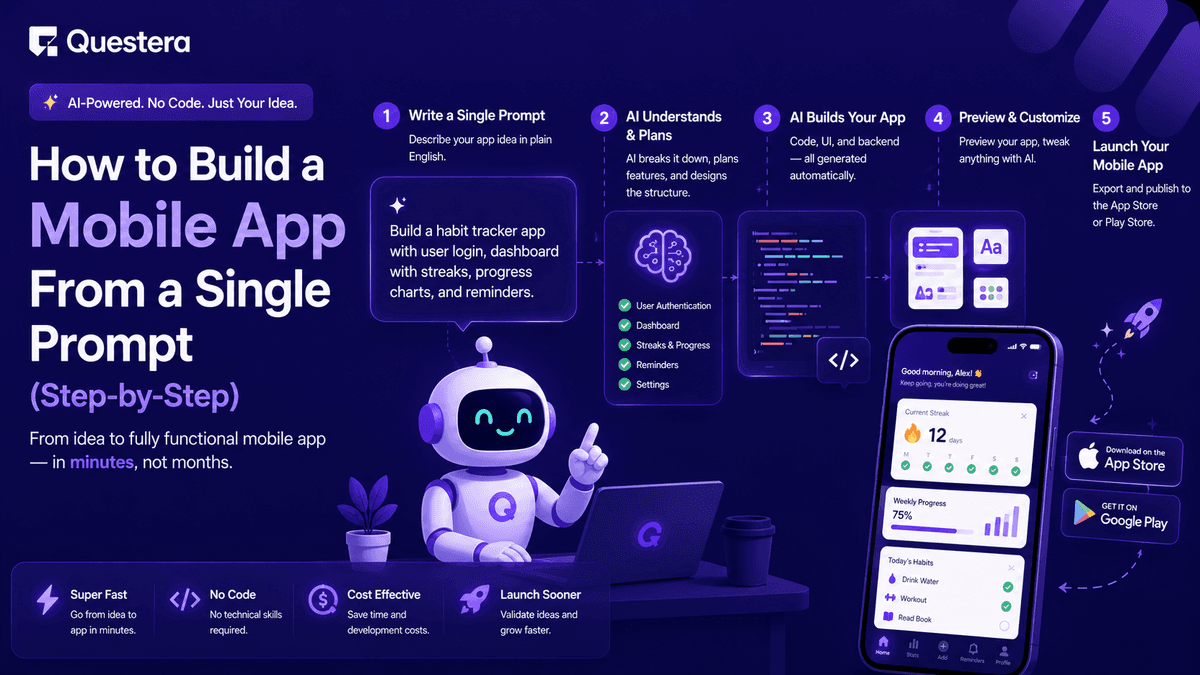
Building a mobile app from a single prompt means describing the entire app — user, core feature, screens, data, and design — in one structured paragraph that an AI agent uses to scaffold the working product. The platform handles the engineering: framework choice, navigation, data persistence, and deployment to a testable build.
This is fundamentally different from 2020-era no-code mobile tools. Those gave you drag-and-drop blocks with hard limits and a fixed visual language. Modern AI app builders generate real code (usually React Native or Flutter) that runs on iOS and Android, exports to GitHub, and can be extended by developers later if needed.
According to a 2025 a16z report, over 40% of new indie apps shipped through TestFlight in 2025 were generated primarily by AI coding agents. The pattern is no longer niche — it's the default workflow for solo founders shipping mobile in 2026.
What does a good single prompt actually look like?
A good single prompt for a mobile app has five ingredients: target user, core action, data fields, screen structure, and design vibe. Miss any one and the AI fills the gap with generic output you'll have to rewrite.
The five-ingredient prompt formula
The formula that works consistently across platforms is:
"Build a mobile app for [target user] that lets them [core action]. The main data is [entity] with fields: [list 3–5 fields with types]. Include 4 screens: [list screen names]. Use bottom tab navigation. Design vibe: [minimal/bold/playful], [color palette]."
This single paragraph gives the AI enough structure to produce a usable v1 scaffold. Compare it with the lazy version — "build me a fitness app" — and the difference in output quality is night and day.
Build this with a prompt on Greta.sh — describe the app, Greta writes and deploys it.Why specificity beats creativity
Vague prompts produce vague apps. The AI defaults to safe, generic patterns when you don't tell it who the user is or what data the app handles. Naming the user and the fields gives the agent something concrete to design against, which is why the same model produces wildly different output from the same builder depending on prompt quality.
Which platforms handle single-prompt mobile builds best?
Not every AI app builder handles mobile output equally well. Some are web-first and produce responsive web apps that look like mobile apps; others generate real native or React Native builds you can ship to the App Store.
For a true single-prompt-to-mobile workflow, Rork and Famous.ai are the most direct. For solo founders who want one platform handling SaaS, mobile, and growth tooling, Greta is the broader pick. For React-comfortable builders, Lovable produces strong mobile-responsive output.
How to build a mobile app from a single prompt — step by step
The realistic timeline from prompt to a phone-ready app is 4–24 hours of focused work. Here's the exact sequence.
- Step 1: Write the single prompt — Use the five-ingredient formula. Spend 15 minutes here; this prompt sets the foundation for every follow-up.
- Step 2: Pick the right platform — If you need App Store native builds, pick a mobile-first platform (Rork, Famous.ai). If you want a responsive mobile web app first, Greta or Lovable work well.
- Step 3: Run the scaffold prompt — Paste the full structured prompt. Don't add features yet. Wait for the scaffold to finish before any refinement.
- Step 4: Test on a real phone — Open the preview on your actual mobile device, not just a browser emulator. Tap through every screen. Note what feels broken.
- Step 5: Add the core feature with one follow-up prompt — Whatever the single most important action is, focus your second prompt entirely on that flow.
- Step 6: Wire up data persistence — One prompt to add a database (Supabase or built-in) and connect it to your forms and lists.
- Step 7: Add authentication — Email magic-link auth is fastest. Social logins (Apple, Google) come later if you're publishing to the App Store.
- Step 8: Polish for mobile — Explicitly prompt "make every screen feel native on iOS and Android — fix tap targets, spacing, and safe areas." Test on phone again.
- Step 9: Add a paywall or payments if needed — Stripe or in-app purchases. App Store apps require IAP for digital subscriptions; web-based mobile apps can use Stripe.
- Step 10: Build for TestFlight or Expo Go — Most platforms have a one-click path to a testable mobile build. Share with 5–10 friends, fix top issues, iterate.
This whole loop can compress into a single day for a simple app, or stretch across a week for something with multi-tab navigation, AI features, and payments.
What does a real single-prompt mobile build look like?
A worked example helps. Here's a complete single prompt for a workout tracker:
"Build a mobile app for solo strength trainers that lets them log workouts and track progress over time. The main data is a Workout with fields: exercise name (text), sets (number), reps (number), weight in kg (number), date (timestamp), and notes (optional text). Include 4 screens: Home (today's workout + streak), History (list of past workouts, newest first), Add Workout (form), and Profile (settings + sign out). Use bottom tab navigation. Design vibe: minimal and dark, with a single accent color (electric green)."
This single paragraph gets a usable scaffold on every modern AI mobile builder. From there, you'd add follow-ups for progress charts, personal record callouts, and onboarding — but the structure is already set.
For a deeper walkthrough of this exact pattern, our guide on how to Build a Fitness Tracking App using prompts shows the full prompt sequence and what each follow-up produces.
What kinds of mobile apps work best for single-prompt builds?
Some app categories work much better than others for single-prompt mobile builds. The pattern: anything with a clear input → action → output loop fits naturally.
- Trackers (fitness, habits, food, sleep, mood) — Tight data model, simple input forms, clear history view.
- AI tools (image generators, voice transcribers, photo editors, AI writers) — One core action, AI does the heavy lifting.
- Calculators and converters (tax, currency, fitness macros, project pricing) — Simple inputs, instant output.
- Lists and directories (curated niche directories, mini-marketplaces, find-near-me apps) — Easy to scaffold, easy to monetize with affiliate or freemium.
- Daily check-ins (journaling, gratitude, mental health) — High retention, simple core loop.
- Niche social apps — Single feed + post composer is a well-understood pattern AI builders handle cleanly.
If you're stuck choosing an app type, our list of profitable AI app ideas covers 25 specific ideas that fit single-prompt mobile builds well.
Common Mistakes to Avoid
- Writing a vague prompt — "Build me a fitness app" is the most common failure pattern. Always use the five-ingredient formula.
- Picking the wrong platform — Web-first builders produce mobile-responsive sites, not native apps. If you're targeting the App Store, pick a mobile-first platform from the start.
- Skipping the on-phone test — Browser emulators lie. Tap targets, scrolling, and safe areas only behave correctly on a real device. Test on your actual phone after every major prompt.
- Asking for too many features in one prompt — One scaffold prompt + 5–10 focused follow-ups beats one mega-prompt every time. We cover this in detail in our Ultimate Prompt Library for AI App Builders.
- Ignoring App Store policies for payments — Apple requires in-app purchases for digital subscriptions sold inside iOS apps. Trying to use Stripe inside an App Store app for digital goods will get you rejected.
- Forgetting offline behavior — Mobile users often log data on bad Wi-Fi. Prompt explicitly for a graceful offline state if your app touches the network.
- Launching without analytics — Mobile analytics (PostHog, Mixpanel, or a built-in option) need to be in place before launch. You can't iterate on what you can't see.
Frequently Asked Questions
1. Can a non-developer really build a mobile app from a single prompt?
Yes — modern AI mobile builders like Greta, Lovable, Bolt, Rork, and Famous.ai produce working mobile apps from one structured prompt. The output is usually a v1 scaffold that needs 5–10 follow-up prompts to refine into a launchable app, but the core build genuinely starts from a single prompt.
2. How long does it take to build a mobile app from a single prompt?
A simple mobile app (tracker, calculator, AI tool) can go from prompt to a phone-ready build in 4–24 hours of focused work. More complex apps with multi-tab navigation, AI features, and payments typically take 3–7 days end to end.
3. What's the best platform for building a mobile app from a single prompt?
For native iOS and Android builds, Rork and Famous.ai are purpose-built for mobile-first single-prompt workflows. For broader founder use cases where you also want web and growth tooling, Greta is the most flexible. For React-comfortable builders, Lovable produces strong mobile-responsive output.
4. Do I need any coding skills to build a mobile app this way?
No traditional coding skills required, but you do need to read what the AI generates and describe problems clearly. Think of it like managing a junior developer — you guide the work, you don't write it.
5. Can I publish a single-prompt-built mobile app to the App Store?
Yes — platforms that generate React Native or native code (Rork, Famous.ai, some Bolt configurations) produce App Store-ready builds. You'll still need an Apple Developer account ($99/year), an App Store listing, and to follow Apple's review guidelines, especially around payments.
6. How much does it cost to build and ship a mobile app from a single prompt?
Launch costs typically run $150–$400: AI app builder subscription ($20–$50/month), Apple Developer account ($99/year if iOS), Google Play developer fee ($25 one-time), domain (if you have a marketing site), and AI API credits ($20–$50). No developer or agency fees.
7. Are AI-built mobile apps as good as hand-coded ones?
For simple to moderately complex apps, yes — the output is comparable. For complex apps with custom infrastructure, heavy real-time features, or App Store-specific edge cases, you'll usually still need engineering review before launch. We cover the broader question in our piece on whether Vibe Coding is the End of Software Engineering Jobs.
Conclusion
- Building a mobile app from a single prompt is no longer experimental — it's how solo founders ship mobile apps in 2026, going from idea to phone-ready build in hours.
- The five-ingredient formula (target user, core action, data fields, screen structure, design vibe) is the difference between a generic scaffold and a usable v1.
- Picking the right platform matters more than picking the best prompt. Web-first builders produce mobile-responsive sites; mobile-first builders (Rork, Famous.ai) produce App Store-ready builds.
- One scaffold prompt + 5–10 focused follow-ups consistently beats one mega-prompt. The build is iterative, even when it starts from a single line.
If you want the broader playbook for shipping software end-to-end this way, our guide on how to Build a SaaS App in 2026 without writing code covers the full workflow. Pick your idea, write your one structured prompt, and run it tonight. The biggest barrier between you and a mobile app is no longer code — it's the clarity of your first prompt.





© 2026 Questera
Follow in Google