






How to Use Greta With GitHub for Continuous Delivery?

TL;DR
- Greta generates application code; GitHub manages and versions it
- GitHub Actions enables automated CI/CD for Greta projects
- Each code change triggers build, validation, and deployment
- This setup reduces manual releases and deployment errors
- Ideal for beginners adopting AI-powered DevOps workflows
Introduction: From AI-Generated Code to Reliable Delivery
AI tools like Greta have made it dramatically easier to generate full-stack applications in minutes. But once the code exists, a new challenge begins: how do you ship updates reliably, repeatedly, and without manual effort? This is where GitHub Actions CI/CD and continuous integration and deployment come into play.
Many teams stop at code generation. The teams that scale go further; they automate delivery. By combining Greta with GitHub Actions, you can automate deployment with GitHub, reduce human error, and turn AI-generated code into a production-ready system. This guide is written for software engineers, founders, and teams who want a practical, beginner-friendly explanation of how to connect Greta with GitHub Actions and build a real CI/CD pipeline.
What Continuous Integration and Deployment Really Means?
Before jumping into tools, let’s clarify the concept.
Continuous integration and deployment is the practice of automatically building, testing, and deploying code whenever changes are made. Instead of manually pushing updates, the system does the work for you.
With GitHub Actions CI/CD, every change to your repository can trigger:
- A build
- Basic checks or tests
- An automatic deployment
When paired with Greta, this creates a powerful loop: AI generates code → GitHub manages changes → GitHub Actions automates delivery.
Why Use GitHub Actions With Greta
Greta focuses on creating and evolving your application. GitHub focuses on managing code. GitHub Actions focuses on automation. Together, they form a complete, continuous integration and deployment workflow.
Key benefits include:
- You can automate deployment with GitHub after every Greta update
- You reduce manual release steps
- You introduce discipline into AI-assisted development
This combination is especially useful for teams exploring AI-powered DevOps without building complex pipelines from scratch.
Clear separation of responsibilities
Greta focuses on generating and evolving application code, while GitHub Actions CI/CD manages builds, checks, and releases.
Automated and repeatable deployments
Using GitHub Actions helps you automate deployment with GitHub, removing manual steps and reducing release errors.
Built-in continuous integration and deployment
Every code change triggered by Greta can automatically go through a continuous integration and deployment workflow.
Safer handling of AI-generated code
GitHub Actions introduces validation checkpoints before deployment, adding control to AI-driven changes.
Build this with a prompt on Greta.sh — describe the app, Greta writes and deploys it.Beginner-friendly DevOps automation
This setup supports AI-powered DevOps without complex infrastructure, making it ideal as a CI/CD pipeline for beginners.
Scales with project growth
What starts as simple GitHub workflow automation can evolve into a full continuous delivery system as your app grows.
Step 1: Generate a Greta Project With Delivery in Mind
When creating your app in Greta, think beyond the UI.
Write prompts that describe:
- Clear features
- Simple flows
- Modular functionality
This helps ensure the generated code is easier to maintain and fits well into a CI/CD pipeline for beginners. AI-generated code still benefits from structure.
Step 2: Fork and Version the Greta Project
Once Greta generates your app, fork or export the repository.
This step is critical because:
- GitHub becomes the source of truth
- Version history enables continuous integration and deployment
- GitHub Actions can only work on repositories
At this point, you are ready to automate deployment with GitHub.
Step 3: Push the Project to GitHub
Create a new GitHub repository and push the Greta-generated code.
Make sure:
- The project builds locally or via basic scripts
- There is a clear root directory
- Dependencies are defined properly
This prepares your repo for GitHub workflow automation.
What Are GitHub Actions (In Simple Terms)
GitHub Actions is GitHub’s built-in automation engine.
It allows you to define workflows that:
- Trigger on events (push, pull request)
- Run scripts in virtual environments
- Deploy applications automatically
This is the engine behind GitHub Actions CI/CD and one of the easiest ways to implement continuous integration and deployment.
Step 4: Create Your First GitHub Actions Workflow
Inside your repository:
Create a folder named .github/workflows
Add a YAML file (for example, ci-cd.yml)
This file defines how GitHub should automate deployment with GitHub.
At a basic level, it includes:
- When the workflow runs
- What environment does it uses
- What commands does it executes
This is the heart of how to set up CI/CD with GitHub Actions.
Want to try one of these? Start on Greta.sh — no setup, no boilerplate — just a prompt.Step 5: Configure Triggers for Continuous Integration
Most teams start with simple triggers:
- On every push to `main`
- On pull requests
This ensures every Greta-generated change is automatically checked. This is a core principle of continuous integration and deployment; problems are caught early, not after release.
Step 6: Automate Builds and Validation
In your GitHub Actions workflow, add steps to:
- Install dependencies
- Build the application
- Run basic checks
Even minimal validation dramatically improves reliability. This is especially important when using AI-generated code and practicing AI-powered DevOps.
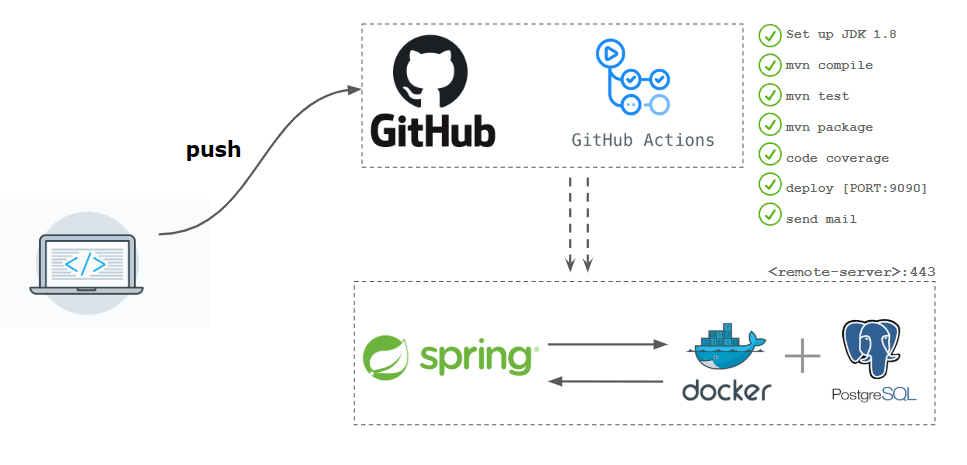
Step 7: Automate Deployment With GitHub Actions
Now comes the payoff.
Once the build passes, GitHub Actions can:
- Deploy to a hosting provider
- Push artifacts to a server
- Trigger a cloud deployment
This is how teams automate deployment with GitHub and eliminate manual releases.
For beginners, start with:
- One environment
- One deployment target
You can expand later.
How Greta Fits Into Ongoing Delivery?
Greta doesn’t replace GitHub Actions; it feeds them.
Every time you:
- Add a feature using Greta
- Refine a prompt
- Regenerate parts of the app
You push changes to GitHub. GitHub Actions CI/CD takes over from there. This loop is what makes continuous integration and deployment practical with AI tools.
AI-Powered DevOps Without Complexity?
Traditional DevOps pipelines can be overwhelming. Greta + GitHub Actions lowers the barrier.
You get:
- No-code CI/CD at the application generation layer
- Scripted automation at the delivery layer
- Human review where it matters
This is a realistic approach to AI deployment automation for small teams.
Ready to ship? Open Greta.sh — your idea → a working app, in one chat.Common Mistakes to Avoid
Teams new to CI/CD often:
- Skip version control discipline
- Trust AI output without review
- Over-engineer workflows early
Start simple. CI/CD pipeline for beginners should evolve gradually.
Best Practices for GitHub Actions CI/CD With Greta
To succeed long-term:
- Keep Greta prompts focused
- Push small, frequent changes
- Use GitHub pull requests for review
- Let automation handle repetition
This balances speed and safety in continuous integration and deployment.
Why This Approach Scales for Teams
As teams grow:
- GitHub manages collaboration
- GitHub Actions enforces consistency
- Greta accelerates development
Together, they form a sustainable system for how to use GitHub for continuous delivery in AI-assisted environments.
Conclusion
Generating code with AI is powerful, but shipping reliably is what makes software real. By combining Greta with GitHub Actions CI/CD, you move from experimentation to execution. You automate deployment with GitHub, introduce discipline through continuous integration and deployment, and create a delivery workflow that scales with your product.
This approach doesn’t require deep DevOps expertise. It requires clarity, consistency, and a willingness to let automation do the heavy lifting. With Greta and GitHub Actions working together, AI-generated apps can ship with confidence.
FAQ
Is GitHub a CI tool?
GitHub itself is a version control platform, but with GitHub Actions, it becomes a full CI/CD automation tool.
How to do GitHub integration?
Generate your app in Greta, fork or export the project, then push the code to a GitHub repository.
Is GitHub safe for proprietary code?
Yes. GitHub offers private repositories, access controls, and encrypted secrets for proprietary projects.
Do I need DevOps experience to use GitHub Actions with Greta?
No. GitHub Actions is beginner-friendly and works well with simple, prebuilt workflows.
How to automate a CI/CD pipeline?
Create a GitHub Actions workflow that runs on code changes to build, test, and deploy your app automatically.





