






Practical Workflow for Building Full-Stack Apps Using Vibe Coding
TL;DR
- Vibe coding workflow helps teams build full stack apps with AI using intent-driven prompts
- Enables faster full stack app development with AI without heavy setup or boilerplate
- Frontend, backend, and database logic are generated in a single AI app builder workflow
- Supports rapid iteration, previews, testing, and deployment
- Ideal for startups looking to build MVP using AI quickly and reliably
- Encourages maintainable, scalable AI-powered app development
- Works best when combined with structured prompts and human review
- Reduces development time while preserving code quality
- Fits modern AI-assisted software development practices
- Designed to help teams build full stack apps fast using AI tools
Building software has changed a lot in the last few years. What once took weeks of planning, setup, and boilerplate work can now be done in days,or even hours,using AI. At the center of this shift is vibe coding, a new way of building applications where you guide AI using intent, context, and prompts instead of writing every line manually.
In this article, we’ll walk through a vibe coding workflow that shows how teams and solo builders are using full stack app development with AI to move faster without losing control. This is not about shortcuts or “one-click apps.” It’s about using AI-powered app development as a structured, repeatable workflow to build full stack apps with AI in a practical, real-world way.
Understanding the Vibe Coding Approach to Full-Stack Development
Vibe coding is a mindset shift. Instead of thinking “code first,” you think “intent first.” You describe what you want to build, how it should behave, and how the pieces connect,and the AI helps translate that into working code.
In a modern vibe coding workflow, AI becomes a collaborator. You still make architectural decisions, review logic, and guide structure, but you no longer start from a blank file. This makes full stack app development with AI more accessible, faster, and easier to iterate on.
What makes vibe coding powerful is that it works across the entire stack. You can use the same approach to design a database schema, generate backend APIs, and build frontend components. That’s why vibe coding is becoming a core part of AI-powered app development and full stack development using AI.
What Sets Vibe Coding Apart in Real Projects?
Many people confuse vibe coding with simple AI code generation. The difference is workflow.
A traditional AI coding workflow often looks like this: ask for a snippet, paste it, tweak it, repeat. Vibe coding is different. It’s a connected AI app builder workflow where prompts build on each other and the AI understands the project context over time.
In real projects, this means you can:
- Generate consistent code across files
- Maintain shared logic and naming conventions
- Iterate without rewriting everything
This approach makes it easier to build full-stack apps with AI that are maintainable, not just impressive demos.
Key Capabilities of Modern Vibe Coding Tools
To support a strong vibe coding workflow, modern tools focus on more than raw generation. They support the full lifecycle of AI-assisted software development.
Some core capabilities include:
- Understanding high-level prompts and translating them into structured code
- Managing frontend, backend, and database logic together
- Supporting iterative refinement instead of one-off outputs
- Working with existing codebases and files
These capabilities are what make AI-powered app development viable for real products and not just prototypes.
Build this with a prompt on Greta.sh — describe the app, Greta writes and deploys it.Step-by-Step Process for Building Full-Stack Apps
Let’s break down a practical workflow you can follow to build full stack apps with AI using vibe coding principles.
You start by defining the product at a high level. Instead of jumping into implementation, you describe the app’s purpose, users, and core features. This context helps the AI understand what you’re building.
Next, you move layer by layer:
- Define data models and relationships
- Generate backend APIs and business logic
- Build frontend pages and components
- Connect everything and test
This structured AI workflow for web app development ensures a predictable and efficient process.
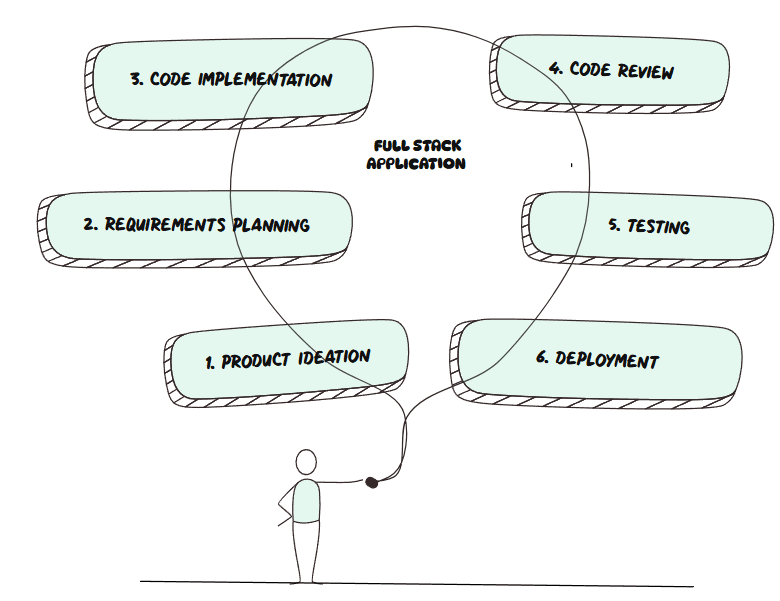
| Step | Action | Result |
|---|---|---|
| 1 | Initialize repository and project structure | Clean, organized foundation for development |
| 2 | Define database schema using AI prompts | Backend structure ready for data operations |
| 3 | Generate backend logic and APIs | Functional endpoints for core features |
| 4 | Create frontend components | UI screens connected to backend logic |
| 5 | Run AI-assisted code review | Improved readability, structure, and quality |
| 6 | Execute unit and integration tests | Verified and reliable application behavior |
| 7 | Deploy the application | Live, working full-stack app ready for users |
Example Prompt Workflow
Here’s what a simple vibe coding flow might look like:
- Prompt 1: “Create a database schema for a task management app with users, tasks, and status tracking.”
- Prompt 2: “Generate REST APIs for creating, updating, and listing tasks with authentication.”
- Prompt 3: “Build a responsive frontend dashboard to manage tasks.”
Each prompt builds on the previous one. This chaining is what turns prompts into a real AI coding workflow and allows you to build MVP using AI without chaos.
Advanced Workflow Considerations
As projects grow, vibe coding becomes even more valuable. You’re no longer just generating code,you’re refining it.
Advanced workflows focus on:
- Improving performance
- Refactoring structure
- Adding validations and edge cases
This is where full stack app development with AI shines. You can ask the AI to review existing logic, suggest improvements, or adapt features as requirements change.
Managing Multi-File Projects
One common concern is how AI handles larger codebases. In a good vibe coding full stack workflow, you guide the AI file by file.
Instead of saying “build the whole app,” you work in focused steps:
- Update this service
- Refactor this component
- Add tests for this function
This makes AI-assisted software development predictable and safe, even for growing apps.
Case Examples of Vibe Coding in Action
Vibe coding works especially well for common SaaS and internal tools. Teams regularly use it to:
- Build admin dashboards
- Create CRUD-based apps
- Launch MVPs for validation
In many cases, teams build full stack apps fast by combining vibe coding with clear prompts and review cycles. The result is working software that feels intentional, not auto-generated.
This is why AI-powered app development is becoming popular among startups that want speed without sacrificing quality.
Want to try one of these? Start on Greta.sh — no setup, no boilerplate — just a prompt.How Vibe Coding Integrates Into Existing Toolchains
Vibe coding doesn’t replace your tools,it fits into them. You still use version control, deployment platforms, and testing tools.
The difference is how code gets written. Instead of manually coding every change, you use AI tools for full stack developers to accelerate each step.
This integration makes the AI app builder workflow feel natural and familiar, especially for developers used to modern stacks.
Essential Features for Efficient Vibe Coding Workflows
If you want a smooth vibe coding workflow, look for tools that support:
- Context awareness across files
- Editable, transparent outputs
- Iterative prompt refinement
- Support for frontend and backend logic
These features are essential for sustainable full-stack development using AI and long-term AI-powered app development.
Real-World Use Cases with Greta
Greta is designed around a modern vibe coding workflow that simplifies how teams approach full stack app development with AI. Instead of spending time setting up local environments, configuring packages, or writing deployment scripts, Greta lets you focus on what actually matters,describing what you want to build.
Using natural language prompts, developers can build full stack apps with AI that are ready to preview, refine, and deploy. This approach makes AI-powered app development feel structured and intentional rather than experimental.
Prototyping with Greta feels fast, practical, and surprisingly controlled,ideal for teams looking to move quickly without sacrificing clarity.
How the Greta Vibe Coding Workflow Works
Sign in to Greta:
Start a new project directly in the browser,no local setup required.
Describe your app using natural language:
Explain your idea, features, and constraints. Greta interprets this intent as part of a structured AI app builder workflow.
Preview generated frontend and backend code:
Instantly view AI-generated UI components, backend logic, and data handling as part of full stack development using AI.
Edit and refine multiple files:
Update frontend, backend, or logic files using prompts or manual edits, ideal for AI-assisted software development.
Deploy with minimal configuration:
Launch your app using a streamlined deployment flow, making it easy to build MVP using AI and test ideas quickly.
This AI workflow for web app development allows teams to move from idea to live application without breaking momentum.
Key Features That Support AI-Powered App Development
Greta is built to support a complete vibe coding full stack experience, from idea to deployment.
Live Preview Panel:
Instantly see changes across frontend and backend as code is generated or refined.
Simplified Deployment Flow:
Deploy web apps and full stack applications without managing infrastructure or scripts.
Multi-File Awareness:
Work across frontend, backend, and configuration files in a single AI app builder workflow.
AI Assistance Across the Stack:
Get help with logic suggestions, unit test generation, bug fixes, and refactoring,core to AI tools for full stack developers.
Rapid Iteration with Prompts:
Refine features, layouts, or logic using conversational updates,perfect for teams that want to build full stack apps fast.
Command-Based Updates:
Apply targeted changes using prompt commands to keep iterations efficient and focused.
Together, these features make full stack app development with AI practical, scalable, and repeatable.
Example Projects Built Using Greta
Here are a few realistic examples that show how teams build full stack apps with AI using Greta’s vibe coding approach:
| App Type | Example Prompt | Result |
|---|---|---|
| Task Manager | “Create a drag-and-drop task manager with user notifications” | Full stack prototype ready for testing and iteration |
| Expense Tracker | “Build a multi-user expense tracker with charts and monthly summaries” | Backend APIs and frontend dashboards generated |
| Social Feed | “Develop a social feed with likes, comments, and notifications” | Deployed web app with full stack integration |
These examples highlight how AI-powered app development can be used for real use cases,not just proofs of concept.
Why Teams Choose Greta for Vibe Coding
Greta helps teams visualize their entire project,folder structure, live previews, and deployed apps, in one place. This transparency improves collaboration and reduces friction during handoffs between product, design, and engineering.
Whether you’re trying to build MVP using AI, refine an internal tool, or ship a customer-facing product, Greta supports a sustainable path for full stack app development with AI.
Ready to ship? Open Greta.sh — your idea → a working app, in one chat.Conclusion
Vibe coding is not about replacing developers or skipping fundamentals. It’s about creating a smarter vibe coding workflow where AI handles repetitive work and humans focus on decisions that matter.
By following a structured approach, you can confidently build full stack apps with AI, speed up delivery, and still ship maintainable software. As AI-powered app development continues to evolve, vibe coding will become a core skill for anyone serious about modern full stack development using AI.
FAQs
1. What is vibe coding?
Vibe coding is an approach where you guide AI using intent-based prompts to generate and refine application code.
2. Is vibe coding suitable for production apps?
Yes, when used with a structured AI coding workflow, it works well for real products.
3. Can beginners use vibe coding?
Absolutely. It makes how to build apps using AI more approachable for non-experts.
4. Does vibe coding replace traditional coding?
No. It complements it as part of AI-assisted software development.
5. What types of apps work best with vibe coding?
CRUD apps, dashboards, SaaS tools, and MVPs are ideal.
6. How fast can I build an MVP using AI?
Many teams build MVP using AI in days instead of weeks.
7. Is vibe coding only for frontend?
No. It supports vibe coding full stack workflows.
8. How do I maintain code quality?
By reviewing outputs and iterating prompts carefully.
9. Can vibe coding work with existing codebases?
Yes, modern tools support incremental updates.
10. Is vibe coding the future of development?
It’s a major part of the future of full stack app development with AI and AI-powered app development.





