






What Is MCP (Model Context Protocol) and Why It Matters for App Builders
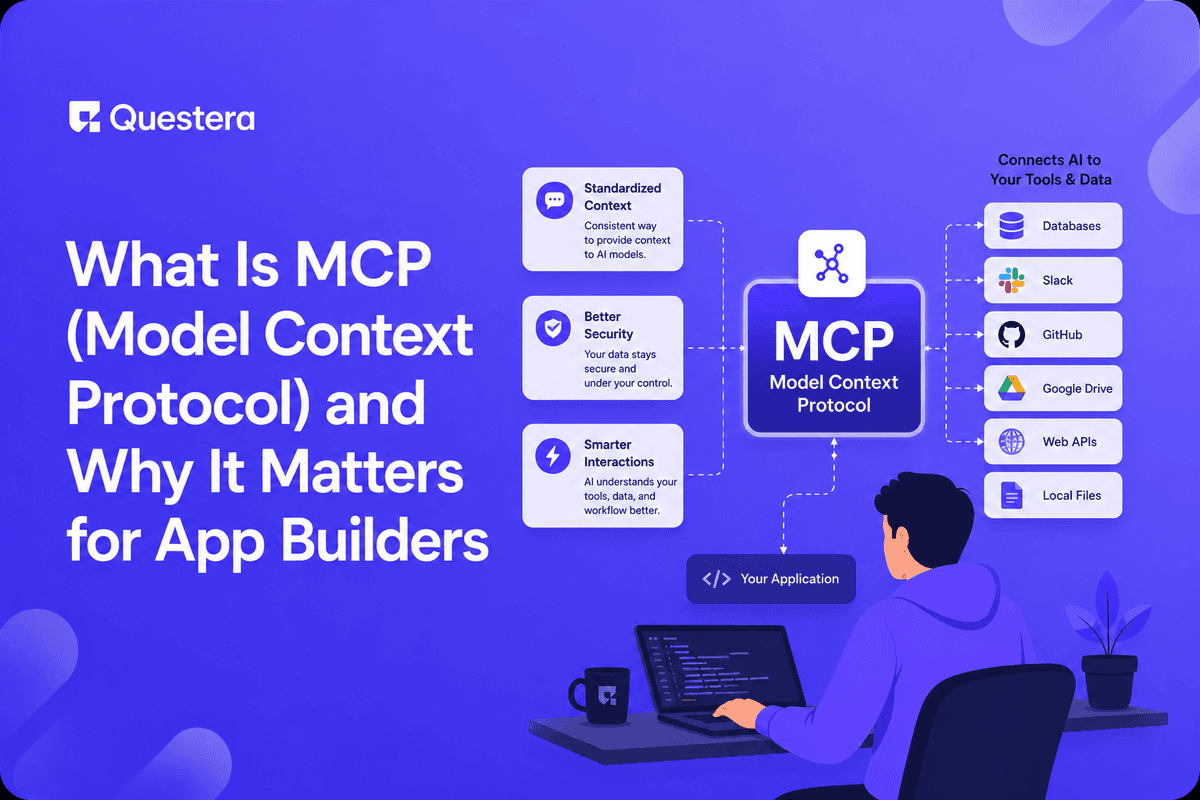
MCP (Model Context Protocol) is an open standard letting AI models connect to external data sources, tools, and applications through a consistent interface. Introduced by Anthropic in late 2024 and widely adopted by 2026, it's becoming the 'USB-C of AI integrations' — one protocol that any model can use to talk to any data source. For app builders, MCP means easier integration of AI features into your product, the ability to expose your SaaS as an MCP server (letting customers use AI assistants with your data), and a reduction in custom integration code. This guide explains MCP in plain English, what it enables, real examples, and what it means for builders.
Before MCP, every AI integration was bespoke. Want Claude to read your Google Drive? Custom integration. Want ChatGPT to read your Notion? Custom integration. Want any AI assistant to use your SaaS's data? Custom integration for each AI provider. MCP changes this. The same MCP server works with Claude, with custom AI agents, with whatever AI clients support the protocol.
Got an idea? Build it now!
Just start with a simple Prompt
Get Started Today


What MCP Actually Is
MCP is a specification for how AI models (clients) communicate with external services (servers). The protocol defines three primary capabilities a server can offer: resources (data the model can read), tools (functions the model can call), and prompts (predefined templates the model can use).
Resources
- Data the AI can read
- Files, database records, API responses, documents
- Example: a Notion MCP server exposes your Notion pages as resources
- Model reads resources to gain context
Tools
- Functions the AI can call
- Actions, queries, mutations
- Example: a GitHub MCP server exposes 'create issue,' 'list PRs,' 'merge PR' as tools
- Model calls tools to perform actions
Prompts
- Predefined prompt templates the server provides
- Standardized ways to use the server's capabilities
- Example: 'Summarize this document,' 'Find similar issues'
- Discoverable by the AI client
Why MCP Matters: The Analogy
The USB-C analogy worked because it captures the situation. Before USB-C, every laptop manufacturer used proprietary chargers. Every monitor had a different cable. USB-C didn't add new capabilities; it standardized existing capabilities through one interface. Result: ecosystem benefit. Buy one USB-C charger; it works with everything.
Pre-MCP, every AI integration was proprietary. Anthropic built specific Google Drive integration for Claude. OpenAI built specific integrations for ChatGPT. Each app builder integrated AI providers separately. The work didn't compound; every new AI client meant rebuilding all integrations. MCP standardizes the interface. Build one MCP server for Google Drive; any MCP client can use it. Build one MCP server for your SaaS; any AI assistant can connect. The work compounds across the ecosystem.
MCP Architecture
- Client — The AI application (Claude Desktop, custom agent, MCP-enabled IDE)
- Server — Exposes resources/tools/prompts via MCP
- Communication — JSON-RPC over stdio (local) or HTTP/SSE (remote)
- Discovery — Client queries server for available capabilities
- Invocation — Client calls server's tools or reads resources
- Authentication — Standard auth patterns (API keys, OAuth)
Examples of MCP Servers in the Wild
- Filesystem — Read/write local files
- Git / GitHub — Repository operations, PR management
- Google Drive — Read documents and spreadsheets
- Notion — Read pages, query databases, create entries
- Slack — Read messages, post messages, manage channels
- Postgres — Query databases with read-only access
- Linear — Read/create issues and projects
- Stripe — Read customer and payment data
- Brave Search — Web search results
- Memory servers — Persistent memory across conversations
- Custom enterprise — Companies building MCP servers for their internal data
Got an idea? Build it now!
Just start with a simple Prompt
Get Started Today
How MCP Differs from Traditional APIs
Traditional API Integration
- Custom code per API
- Each AI client integrates each API separately
- Capabilities discovered from API documentation manually
- Authentication unique per API
MCP Integration
- Standardized interface for AI-tool interaction
- Server discovery (model can ask 'what can you do?')
- Type-safe tool definitions with schemas
- Standard authentication patterns
When MCP Is Better Than Direct API
- When you want AI assistants to use your service in agentic workflows
- When you need consistent integration across multiple AI clients
- When you want capability discovery (AI figures out what's possible)
- When you want to expose services for AI use specifically
When Direct API Is Still Appropriate
- Programmatic access from non-AI applications
- Bulk operations
- Complex queries requiring custom logic
- Performance-critical paths
- MCP and direct APIs coexist; not either/or
What MCP Enables for App Builders
1. Easier AI Integration Into Your Apps
- Point your app's AI features at MCP servers for data sources
- Avoid writing custom integration code for each external service
- Faster shipping of AI features that draw on external data
- Example: AI feature that summarizes user's Notion pages — use Notion MCP server rather than building Notion integration
2. Expose Your SaaS as MCP Server
- Let customers use AI assistants with your data
- Build MCP server for your SaaS's data and operations
- Customers configure their AI tools to use your MCP server
- Example: a project management SaaS exposes 'list tasks,' 'create task,' 'assign task' as MCP tools
3. Build Agentic Features
- Multi-step AI workflows using MCP for tool calls
- Agent reads data, takes actions, reads more data, takes more actions
- Loop pattern enabled by tool calling through MCP
- More powerful AI features than chat-only patterns
4. Plug Into Broader AI Ecosystem
- Your MCP server works with Claude Desktop, MCP-enabled IDEs, custom agents
- Increases distribution of your product
- Future-proof against AI client evolution
- Standard skill set for developers (build once for the protocol)
Got an idea? Build it now!
Just start with a simple Prompt
Get Started Today
Building Your First MCP Server
Common Starting Points
- Anthropic's MCP SDK (Python, TypeScript, others)
- Choose what to expose: resources (read), tools (actions), prompts (templates)
- Define schemas for tool inputs and outputs
- Implement the underlying logic (queries, API calls, etc.)
- Run locally for testing; deploy as HTTP server for remote access
- Document capabilities for users
Realistic Build Time
- Basic MCP server (3-5 tools): 1-2 days
- Production MCP server with auth, error handling, deployment: 1-2 weeks
- Significant MCP server with many capabilities: weeks to months
Architecture Considerations
- Auth: API keys for simple cases; OAuth for user-specific access
- Rate limiting: respect underlying API limits; protect your service from abuse
- Versioning: MCP server capabilities evolve; document changes
- Observability: log MCP requests; monitor for abuse or errors
Real-World MCP Use Cases
Developer Productivity
- Claude Desktop reads your codebase via filesystem MCP
- Reviews PRs via GitHub MCP
- Searches across documentation via various MCP servers
- Manages tasks via Linear/Jira MCP
Customer Support
- Support agent uses AI tool with MCP access to your knowledge base
- AI reads recent tickets, customer history, product documentation
- Suggests responses; agent reviews and sends
- Significantly faster response times
Data Analysis
- AI uses Postgres MCP to query your database
- Asks questions in natural language
- AI generates appropriate SQL, runs query, summarizes results
- Faster than writing SQL manually for ad-hoc analysis
Workflow Automation
- Agent triggered by event (email, webhook, schedule)
- Reads context via MCP servers
- Takes action via tools (send Slack message, create Linear ticket, update database)
- Reports back results
Common Mistakes
- Confusing MCP with proprietary AI plugins — MCP is open standard. Anyone can implement.
- Building proprietary AI integration when MCP server already exists — Use existing server when possible.
- Treating MCP as just another API — It's specifically designed for AI client consumption with capability discovery.
- Over-exposing capabilities in MCP server — Be deliberate about what tools you expose. Each is a security and usability decision.
- Skipping authentication — MCP servers exposing real data need auth. Don't skip.
- Not respecting rate limits — MCP servers can be hammered. Rate limit to protect underlying services.
- Building MCP server before validating demand — Build for needs, not for trend.
- Ignoring observability — Log MCP requests; monitor for errors and abuse.
- Hardcoded credentials in server config — Use environment variables and proper secret management.
Got an idea? Build it now!
Just start with a simple Prompt
Get Started Today
Frequently Asked Questions
Do I need to use MCP for my AI app?
Not necessarily. MCP is useful when integrating with external data sources or letting your app be used by AI assistants. For self-contained AI features in your app (e.g., AI writing assistant using OpenAI API directly), MCP adds complexity without value. Use MCP where it solves problems; don't force-fit.
Is MCP only for Claude?
No. MCP is open. Many AI clients support it (Claude Desktop, various IDE integrations, custom agents). The protocol is model-agnostic. Build for MCP; works across clients.
Should I expose my SaaS as MCP server?
Worth considering. If your users would benefit from AI assistant access to your product's data and operations, building an MCP server increases utility. Examples: project management, knowledge management, customer data tools — all benefit. Simple consumer apps may not need MCP.
How does MCP differ from function calling?
Function calling (OpenAI tools, Claude tool use) is a model capability — letting models call functions. MCP is a protocol — standardizing how those functions are defined, discovered, and called across services. MCP uses function calling internally; it's complementary, not competing.
What are the security implications of MCP?
Same as any service exposing capabilities. Authenticate MCP server access. Authorize per user. Don't expose more than necessary. Log requests. Rate limit. Standard service security applies; MCP doesn't introduce special risks but doesn't eliminate normal security work either.
Where do I learn more about building MCP servers?
Anthropic's MCP documentation is the canonical source. Multiple language SDKs (Python, TypeScript, others). Growing ecosystem of example servers and tutorials. Community contributions on GitHub. The space is moving fast; recent docs are most accurate.
MCP (Model Context Protocol) is an open standard for AI models to connect to external data sources, tools, and applications through a consistent interface — the 'USB-C of AI integrations.' Three capabilities: resources (data AI can read), tools (functions AI can call), prompts (templates AI can use). For app builders: easier AI integration, expose your SaaS as MCP server, enable agentic features. If you're building AI features into apps in 2026, understand MCP basics this week. Try connecting Claude Desktop to existing MCP servers to see the experience. App builders who understand MCP can build more capable AI features faster than those still writing custom integrations for every external service.
Got an idea? Build it now!
Just start with a simple Prompt
Get Started Today
Ready to be a
10x Marketer?
See it in action



© 2026 Questera
Follow in Google